Installation Guide
- Go to Compliance Glossary on Atlassian Marketplace
- Click Install (requires Confluence Cloud admin permissions)
- Once installed, find the app under Apps in your Confluence navigation
- No configuration needed — the app is ready to use immediately
- The app has ten tabs: Dashboard, Terms, Compliance Scanner, Offline Manifest Sync, Git Connector, Requirements Mapper, Terminology Baseline, Activity Log, Audit Evidence Export, and Settings
Requirements: Confluence Cloud only. Built on Atlassian Forge — no DailyMind-operated servers. The GitHub connector is optional and off until an administrator enables it.
Managing Terms
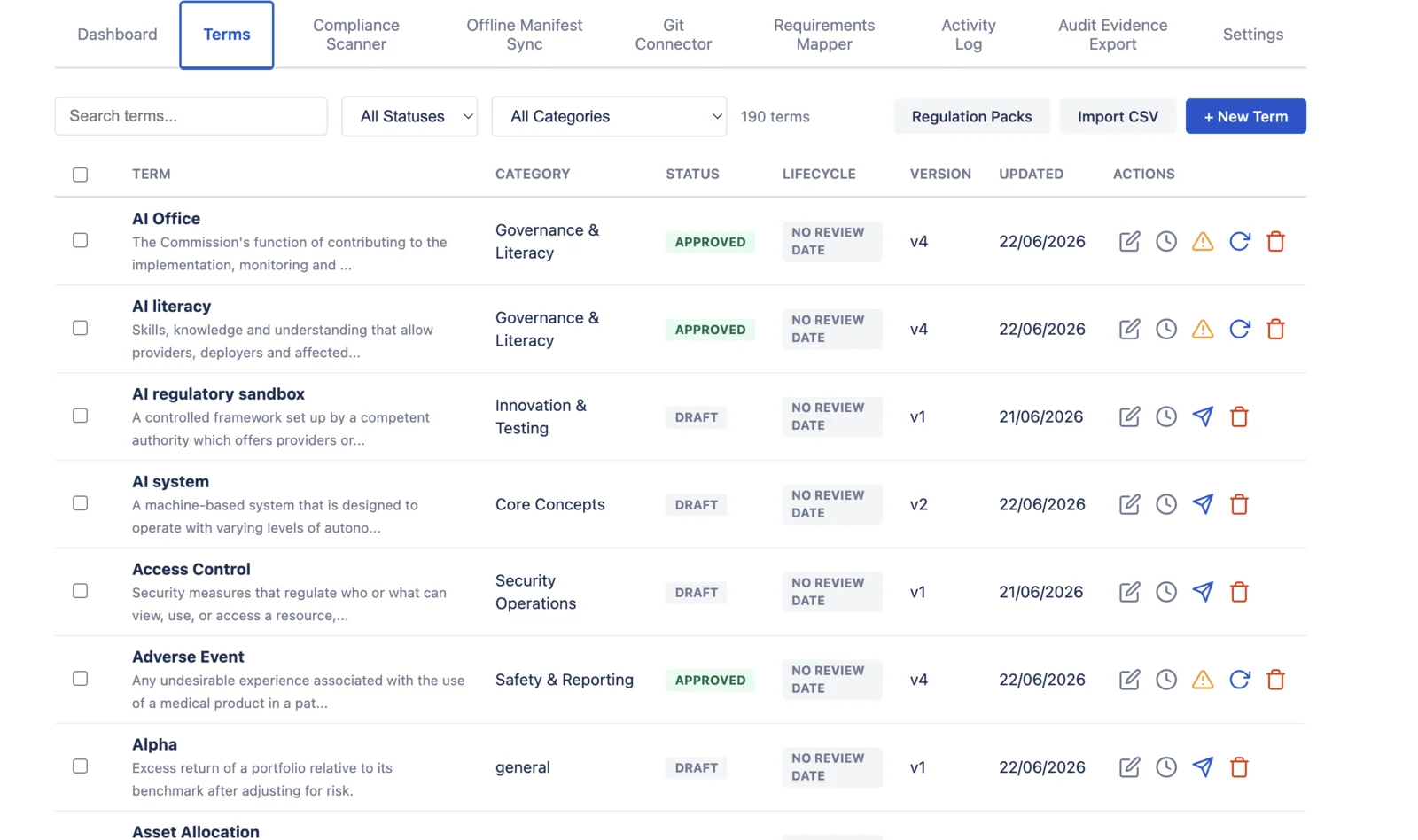
- Create a term: click "+ New Term", fill in the name, definition, category, synonyms, and notes
- Edit a term: every edit creates a new version with automatic diff tracking
- Submit for review: change status from Draft to Review
- Approve / Reject: reviewers approve or reject. Approval is timestamped with user ID.
- Deprecate: mark outdated terms as Deprecated — the scanner will flag any page still using them
- Bulk operations: select multiple terms with checkboxes to deprecate or delete in bulk
- Search and filter: find terms by name, definition, or category. Filter by status.
Approval Workflow
Terms follow a five-stage lifecycle with full audit trail:
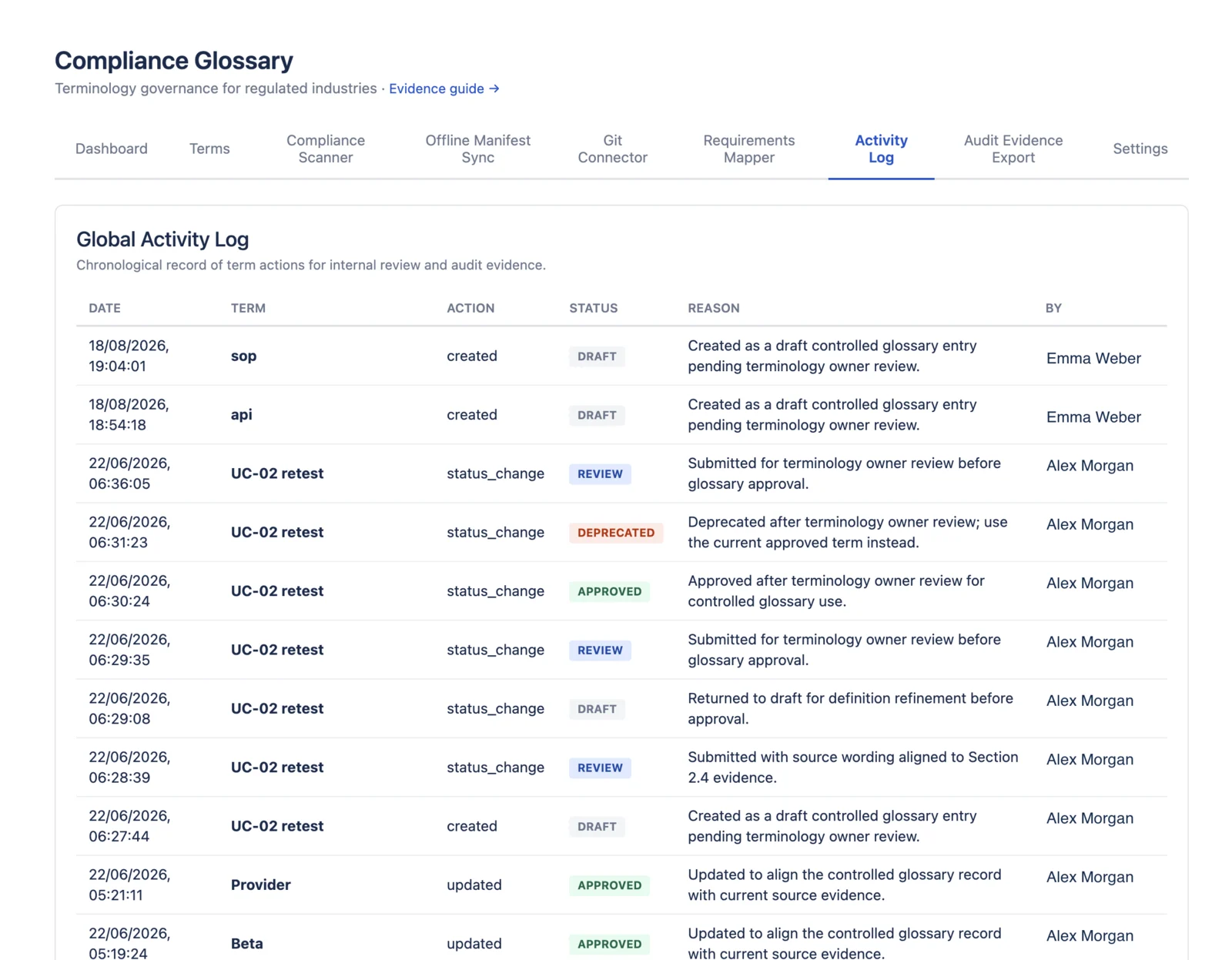
- Four-eyes principle: the person who creates or edits a term cannot approve their own changes — another team member must approve
- Review request: move a term from Draft to Review to request approval
- Approval: reviewer approves or rejects — action is timestamped with user ID
- Deprecation: approved terms can be deprecated when they're no longer current
- Soft delete: deprecated, draft, or review terms can be moved to Deleted — the record and its full history are preserved for audit purposes
- Reactivation: deprecated or deleted terms can be sent back to Review if they need to be reinstated
- Approved terms cannot be deleted directly — they must be deprecated first, ensuring no active approved terminology is lost without a deprecation step
- Audit trail: every status change (including deletion) is recorded in the term's version history
Compliance Scanner
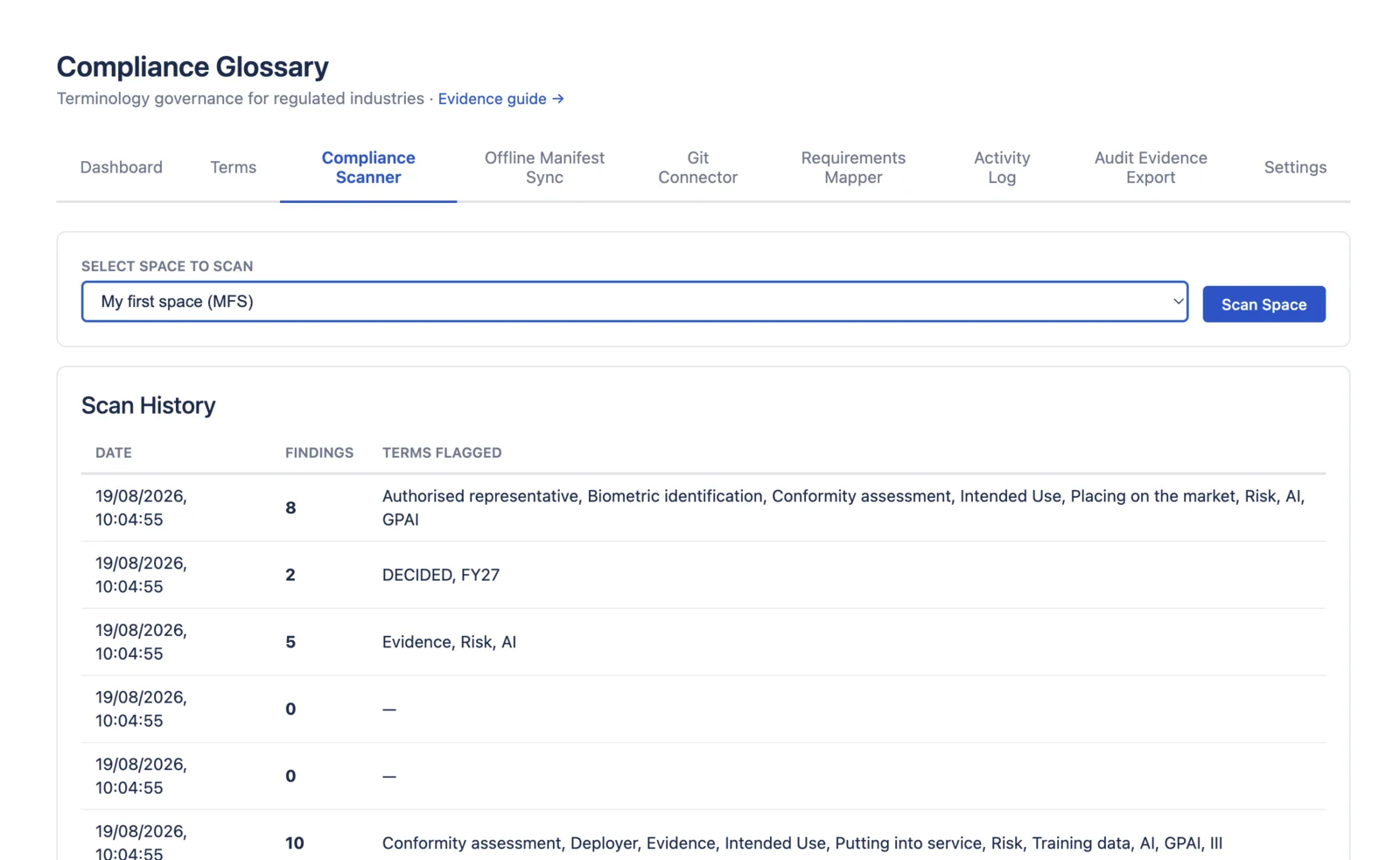
- Auto-scan: triggers automatically when any Confluence page is created or updated
- Manual scan: scan a specific space on demand from the Compliance Scanner tab
- What it detects: deprecated terms, unapproved (draft) terminology, pending review terms, synonym violations, undefined terms
- Each finding shows: the flagged term, which page it was found on, the surrounding context, and the reason for flagging
- Dashboard score: see your overall compliance percentage and breakdown of issues by type
- The scanner uses read-only Confluence access — it never modifies your content
Requirements Mapper
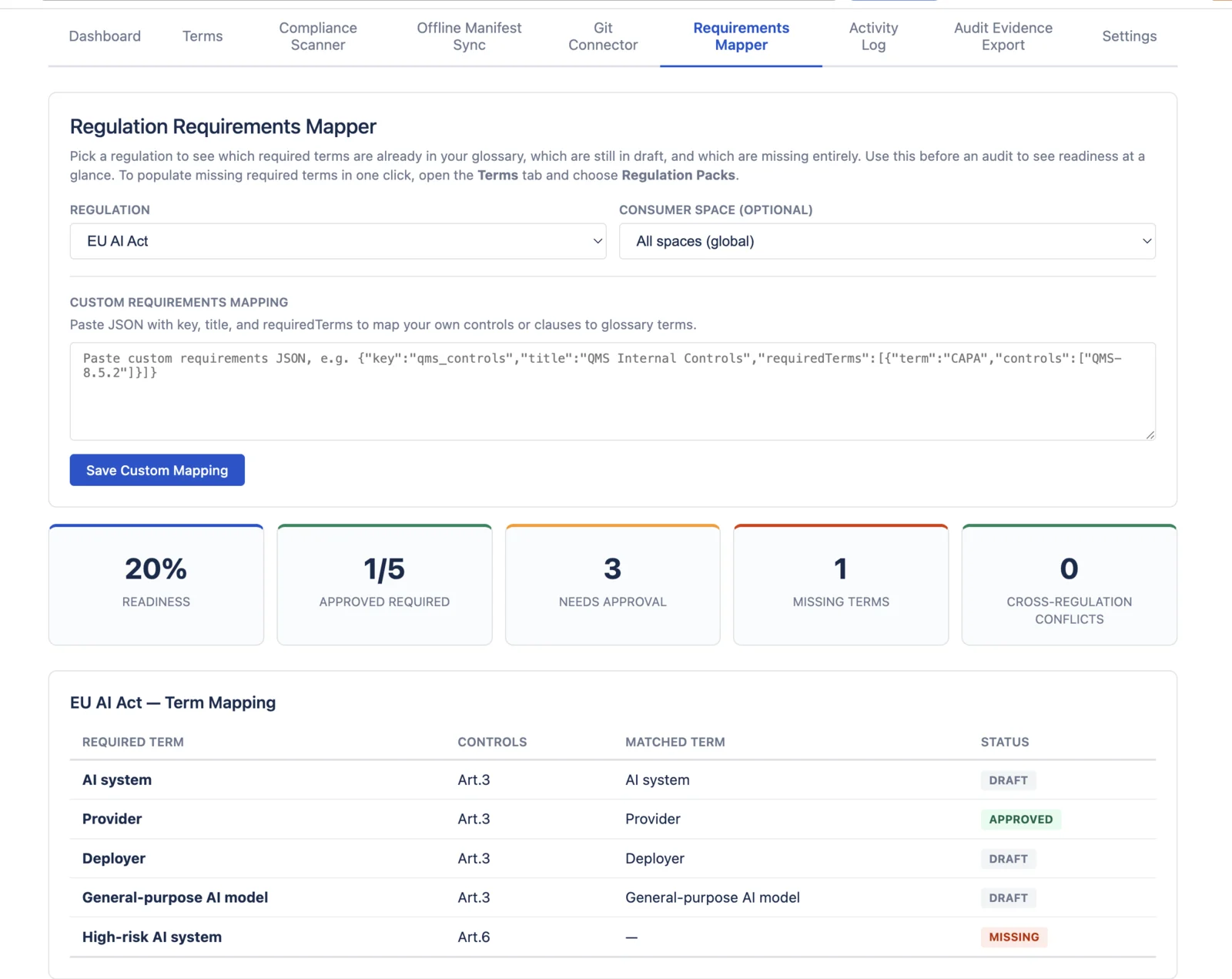
Use the Requirements Mapper before an audit to compare your glossary against a regulation or control catalog.
- Pick a regulation: start with supported catalogs such as EU AI Act, DORA, NIS2, SOC 2, FDA/GxP, ISO/IEC 27001, ISO 13485, and ALCOA+ / GxP terminology packs.
- Choose scope: review all spaces globally or select a consumer space that reads from configured source spaces.
- Readiness score: see approved required terms, terms that need approval, and missing terms at a glance.
- Term mapping: each required term shows the related control or article, matched glossary term, and current status.
- Populate missing terms: open the Terms tab and use Regulation Packs to install missing required terms as drafts.
Settings
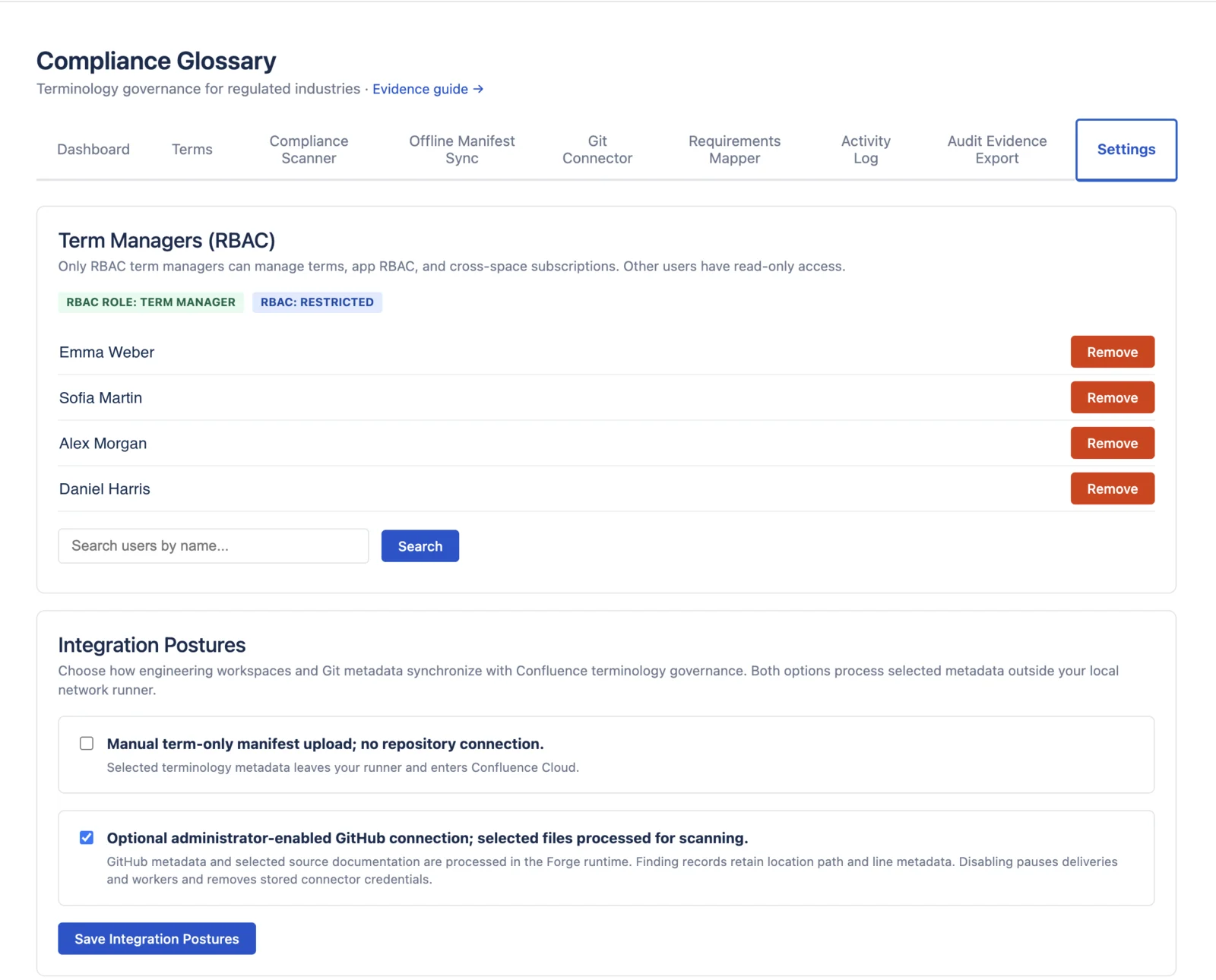
- Term Managers (RBAC): leave access open for small teams, or add term managers to restrict create, edit, approve, delete, scan, and export operations.
- Cross-space subscriptions: pick a consumer space, then select source spaces whose approved terms should be reused there.
- Shared master glossary: useful when Legal or Compliance owns the master terminology and Engineering, Product, QA, or regional spaces need to reference it.
- Appearance: choose light or dark mode for the app interface.
Baselines, Change Impact & Traceability
The glossary is the input. The evidence is the baseline: what was approved, on which page versions, and what depends on it.
- Create a baseline: in Terminology Baseline, pick the spaces, write a reason and select "Create baseline". Approved terms are frozen with their meanings and the scanned Confluence page versions. See what a baseline contains.
- Sign off: enter your role and select "Sign this baseline". Each sign-off records the account, role, time and a fingerprint of the frozen content. It is an in-app attestation, not a qualified electronic signature. Sign-off guide.
- Compare and explain a change: pick two baselines, select "Compare baselines", then "Download change note (text)" with the recorded reasons. Compare guide.
- Term usage and impact: pick a term to see every scanned page that uses it, with page versions and findings, compared with the frozen baseline. Impact guide.
- Enterprise freeze: "Prepare and queue freeze" captures exact revisions, hashes, usages, findings, coverage and approved trace links for the selected spaces, with retention and capacity checks. Freeze guide.
- Trace links: connect regulation, requirement, term, document, code reference and test. A second reviewer approves each link; candidate links stay outside governed evidence. Trace link guide.
- Forward impact and reverse provenance: walk from a requirement to what implements and tests it, or from a test back to the regulation. "Download trace chain" exports the path. Reverse traceability.
- Verify, export, hand off: "Run verification" checks the deposited package without changing it. "Export archive" produces a portable, re-importable archive. "Download reissue handoff" records what your document-control process needs to reissue. Verification · Archive · Reissue.
- Boundary: the app does not approve releases, execute signatures, or reissue documents itself. Full limits: App Limitations.
CSV Evidence Export & Dashboard
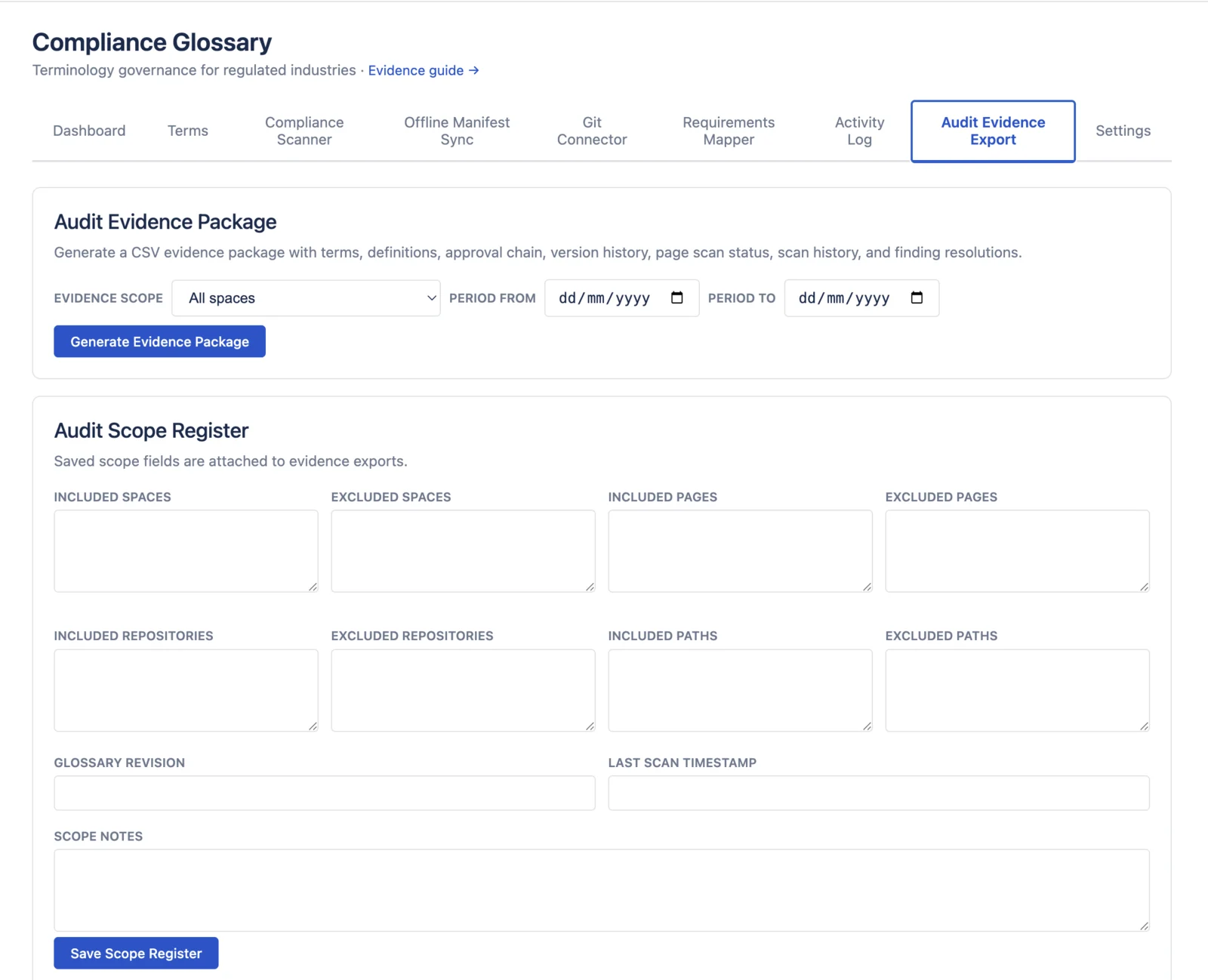
- Generate CSV evidence: click "Generate CSV Evidence" to create a CSV evidence file
- CSV columns: Term, Definition, Status, Category, Version, Approved By, Approved Date, Created At, Updated At, Synonyms
- Version history: expand any term in the report to see all historical changes
- Dashboard: compliance score (% approved), issue count by type, category breakdown
- Export runs entirely in your browser — no data is sent to any external server
CSV Import
Prepare your CSV file with these columns:
GDPR,"General Data Protection Regulation",Privacy,"Data Protection Regulation"
SOX,"Sarbanes-Oxley Act",Financial,Sarbanes-Oxley
HIPAA,"Health Insurance Portability and Accountability Act",Clinical,"health insurance act"
- Required columns: Term, Definition
- Optional columns: Category, Synonyms, Notes
- Synonyms: separate multiple synonyms with semicolons
- Max batch size: 500 terms per import
- Duplicate detection: terms that already exist in your glossary are automatically skipped and reported
- Imported terms start in Draft status — they must go through the approval workflow
Free Terminology Packets
Pre-built terminology packets are delivered by email from their guide pages:
- EU AI Act — 70 verbatim Article 3 definitions
- FDA / 21 CFR Part 11 — 43 terms for pharma & medtech
- SOC 2 — 40 Trust Services Criteria terms
- ISO 27001 — 34 ISMS terminology terms
- DORA — 30 ICT resilience terms
- NIS2 — 32 cybersecurity directive terms
- HIPAA — 34 healthcare privacy and security terms
The in-app Regulation Packs tab also includes starter packs for DORA, NIS2, ISO/IEC 27001, ISO 13485, and ALCOA+ / GxP data integrity. Non-verbatim packs install as drafts for review against the primary source or licensed standard.
Known Limits & System Boundaries
Compliance Glossary runs on Atlassian Forge, which imposes certain platform constraints. These limits are designed into the product and handled gracefully. For the complete list with compliance scope details, see the dedicated App Limitations page.
Scanning
- Space scan: 200,000-page input ceiling (a code limit, not measured production capacity — see scale limits). Uses map-reduce architecture; large spaces are scanned in chunks with a progress bar.
- Term matching: Uses exact word-boundary matching. The scanner detects whole-word matches only — it will not catch plurals, abbreviations, or fuzzy variations (e.g. "AE" won't match "AEs").
- Auto-scan triggers: Fires on page create and update only. Page deletions, moves, and renames do not trigger a scan.
- Scan history: Each scan writes an append-only snapshot alongside the latest result, so earlier scan results are kept.
Data & Storage
- Forge function timeout: Platform-dependent — Forge invocation limits vary by function type. Large scans and exports use bounded batches.
- Runtime memory: 256 MB per function invocation (Forge platform limit).
- CSV import batch size: Maximum 500 terms per CSV file.
- All terms loaded to browser: The term list, search, and filter run client-side. Very large glossaries (thousands of terms) may have slower initial load.
- CSV evidence export: CSV is generated in the browser. Glossaries with 1000+ terms and extensive version history may take several seconds.
Workflow
- No skip-state transitions: Terms must follow the lifecycle (Draft → Review → Approved). You cannot go directly from Draft to Approved.
- Single space per term: Each term belongs to one Confluence space or "ALL". Multi-space assignment is not supported.
- Stale approval threshold: Fixed at 6 months. Not configurable per category or regulation.
- No undo/revert: You can view full version history but cannot revert a term to a previous version.
- Bulk operations: Bulk deprecate and bulk delete process terms sequentially. Large selections may take a moment.
Compliance scope
- No e-signatures: The app uses Atlassian account IDs for attribution, not cryptographic e-signatures (Part 11 Subpart C).
- Role-based access control: Opt-in RBAC — designate term managers (create, edit, approve, delete). Others get read-only access. Activate via Settings tab.
- Finding resolution workflow: Acknowledge, justify, or close each scanner finding. Full resolution audit trail per page-term pair.
- Export format: CSV exports, a print-to-PDF Audit Evidence Package, baseline packages as JSON and CSV, and a content-addressed evidence archive. XML export is not available.
Frequently Asked Questions
Where is my data stored?
Production v6 runs on Atlassian Forge with no DailyMind-operated app servers. Core records use Forge KVS; enterprise evidence uses Forge SQL and Object Store. Its only external egress is an optional, administrator-enabled GitHub connector that calls https://api.github.com. AI-assisted curation uses Atlassian-hosted Forge LLM and starts only when an administrator selects findings. See the privacy policy. Scope note: this marketing site is hosted on Cloudflare Pages and uses self-hosted, cookieless analytics (Umami and GoatCounter on vigilcom.dev) with no third-party trackers; the Forge app itself does not load these.
Does the app modify my Confluence pages?
No. The scanner reads pages to detect terminology issues but never modifies content. Read-only access only.
Who is the app for?
Compliance Glossary is for teams that use Confluence as a controlled documentation workspace and need term-level records: approved definitions, current status, page-scan findings, requirements mapping, and CSV evidence export.
What's the difference between this and a regular glossary?
Generic glossary apps help people find definitions. Compliance Glossary is for compliance, QA, GRC, legal, security, and regulatory teams that need controlled definition records with version history, approval evidence, page-scan findings, requirements mapping, and CSV export. It is not for general glossary browsing, translation management, or page approval alone.
How long does setup take?
Install from Marketplace, add your terms (or bulk import via CSV), and the scanner starts immediately. Most teams are operational in under 30 minutes.
Can I import existing terminology?
Yes. CSV import supports terms, definitions, categories, and synonyms. Duplicates are automatically detected and skipped.
What regulations does this support?
The tool is regulation-agnostic. Teams use it for FDA 21 CFR Part 11, EBA/MiFID II, SOC 2, ISO 27001, GDPR, EU AI Act, and any framework requiring controlled vocabulary. Our compliance guide maps specific features to real regulatory standards.
Where can I find current pricing?
For current pricing, see the Atlassian Marketplace.
Can I evaluate it on a test Confluence site?
Yes. Install on any Confluence Cloud site, including free or developer sites from Atlassian, and start the Marketplace trial.